> This page is for Code Components.
> For clean Markdown of any page, append .md to the page URL.
> For a complete documentation index, see https://developers.webflow.com/llms.txt.
> For AI client integration (Claude Code, Cursor, etc.), connect to the MCP server at https://developers.webflow.com/_mcp/server.
# Link
> Configure a Link property for a code component
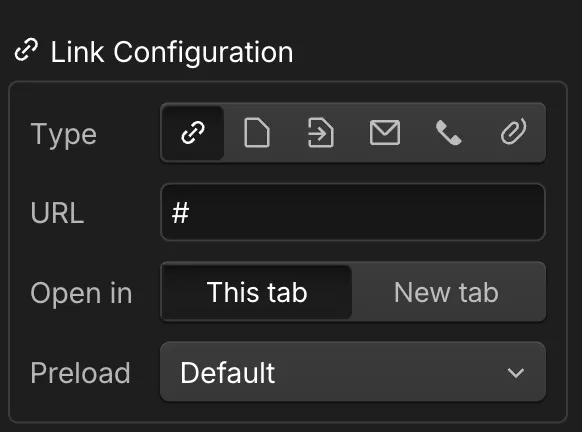
Add a Link property to your component so designers can create clickable links with full control over URL, target behavior, and preload settings.
## Syntax
```tsx
// Prop definition
props.Link({
name: string,
group?: string,
tooltip?: string,
})
// Prop value
{
href: string,
target?: "_self" | "_blank" | string,
preload?: "prerender" | "prefetch" | "none" | string,
}
```
### Prop definition
Define the Link prop in your Webflow code component with a name. Optionally, you can add a group and tooltip text.
```tsx
props.Link({
name: string,
group?: string,
tooltip?: string,
})
```
#### Properties
* `name`: The name for the property.
* `group`: The group for this property (optional).
* `tooltip`: The tooltip for this property (optional).
### Prop value
The Link prop value provides an object to your React component with the following properties:
**`PropType.Link`**
```tsx title="PropType.Link"
{
href: string,
target?: "_self" | "_blank" | string,
preload?: "prerender" | "prefetch" | "none" | string,
}
```
#### Properties returned to the React component
* `href`: The URL destination.
* `target`: How the link opens (optional).
* `preload`: Preload behavior (optional).
#### Webflow properties panel
#### Examples
#### Direct mapping
Define a Link property in your Webflow component, that directly maps to a link property in your React component. If your React component expects a `href` and `target` property, see the [prop mapping](#prop-mapping) example below.
```tsx title={"Button.webflow.tsx"}
import { declareComponent } from '@webflow/react';
import { props } from '@webflow/data-types';
import { Button } from "./Button";
export default declareComponent(Button, {
name: "Button",
description: "A Button component with a Link property",
props: {
link: props.Link({
name: "Button Link",
group: "Navigation"
}),
text: props.Text({
name: "Button Text",
group: "Navigation"
})
}
});
```
```tsx title={"Button.tsx"}
import React from "react";
export interface ButtonProps {
text?: string;
link?: {
href: string;
target?: "_self" | "_blank" | string;
preload?: "prerender" | "prefetch" | "none" | string;
};
}
export const Button = ({ text, link }: ButtonProps) => {
if (!link) return null;
return (
{text}
);
}
```
#### Prop mapping
This example shows how to define a Link property in your Webflow component, with a wrapper to map the link property to the `href` and `target` properties in your React component.
```tsx title={"Button.webflow.tsx"}
import { props, PropType, PropValues } from "@webflow/data-types";
import { declareComponent } from "@webflow/react";
import React from "react";
import { Button, ButtonProps } from "./Button";
// Remove href and target from the props to prevent conflicts
type WebflowButtonProps = {
link: PropValues[PropType.Link];
} & Omit; // Remove buttonText from the props
// Wrapper that destructures the object returned from `props.Link` and passes the href and target to the button component as expected.
const WebflowButton = ({
link: { href, target },
...props
}: WebflowButtonProps) => {
return ;
};
// Component declaration for Webflow
export default declareComponent(WebflowButton, {
name: "Button",
props: {
text: props.Text({
name: "Text",
defaultValue: "Lorem ipsum",
}),
link: props.Link({ name: "Link" }),
},
});
```
```tsx title={"Button.tsx"}
import React from "react";
export interface ButtonProps {
text?: string;
href?: string;
target?: "_self" | "_blank" | string;
}
export const Button = ({ text, href, target }: ButtonProps) => {
if (!href) return null;
return (
{text}
);
}
```
## When to use
Use a Link prop when you want designers to:
* Set URLs for buttons or text links
* Control link behavior (same tab vs new tab)
* Create navigation components
## Best practices
* Handle missing links gracefully
* Add proper rel attributes for security
* Consider accessibility for link text