> This page is for Data API, version v2 Beta.
> For other versions, use one of these documentation indexes:
> - v2 (default): https://developers.webflow.com/data/v2.0.0/llms.txt
> - v2 Beta: https://developers.webflow.com/data/v2.0.0-beta/llms.txt
> - v1: https://developers.webflow.com/data/v1.0.0/llms.txt
> For clean Markdown of any page, append .md to the page URL.
> For a complete documentation index, see https://developers.webflow.com/llms.txt.
> For AI client integration (Claude Code, Cursor, etc.), connect to the MCP server at https://developers.webflow.com/_mcp/server.
# Working with Localization
[Webflow Localization](https://webflow.com/feature/localization) is end-to-end solution for customizing your website for visitors around the world – from design to translation to publishing. With these APIs, your Apps can make dynamic content updates and enable custom localization workflows, providing scalability for growing businesses that are looking to enhance global user engagement and optimize performance for international audiences.
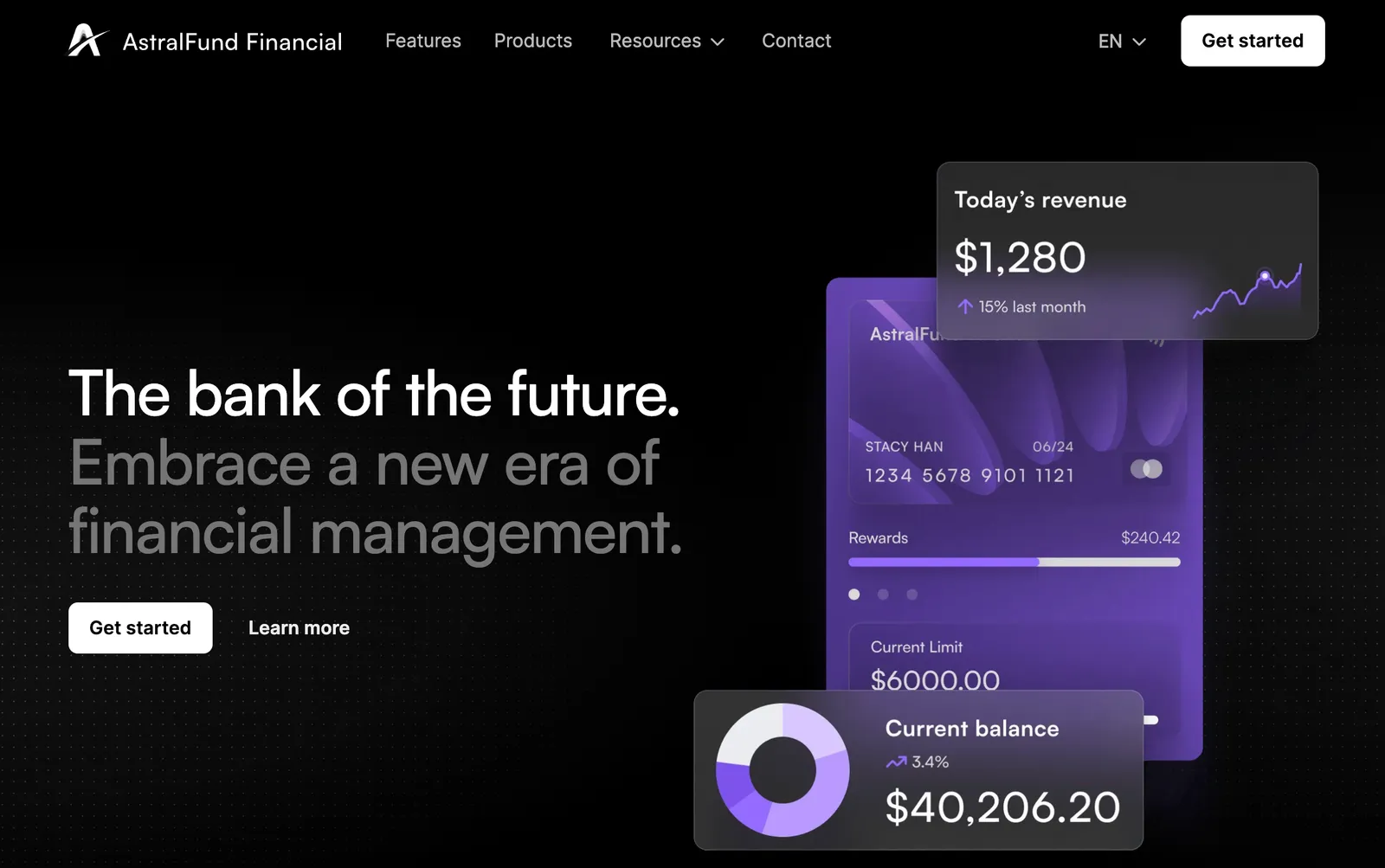
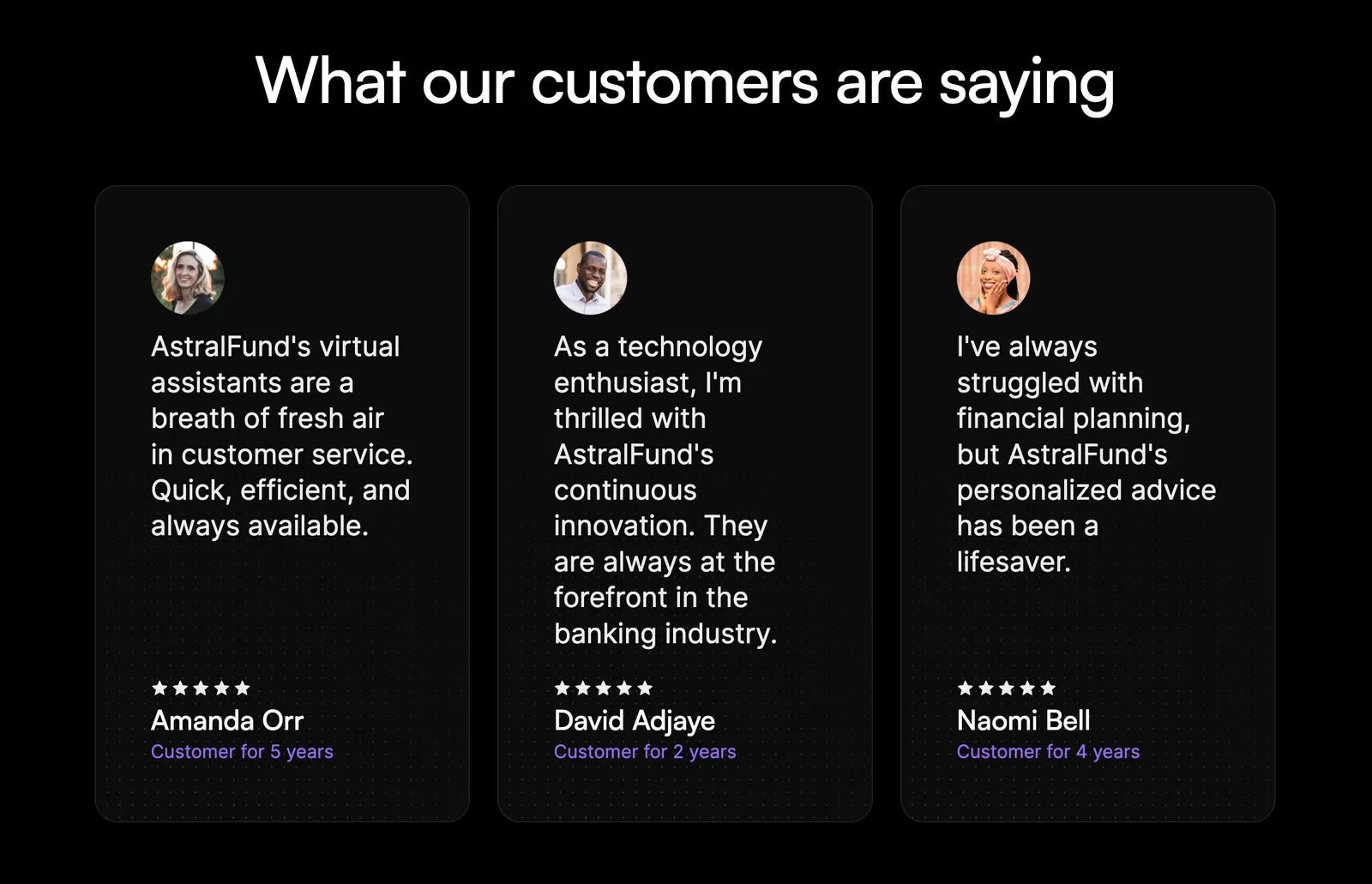
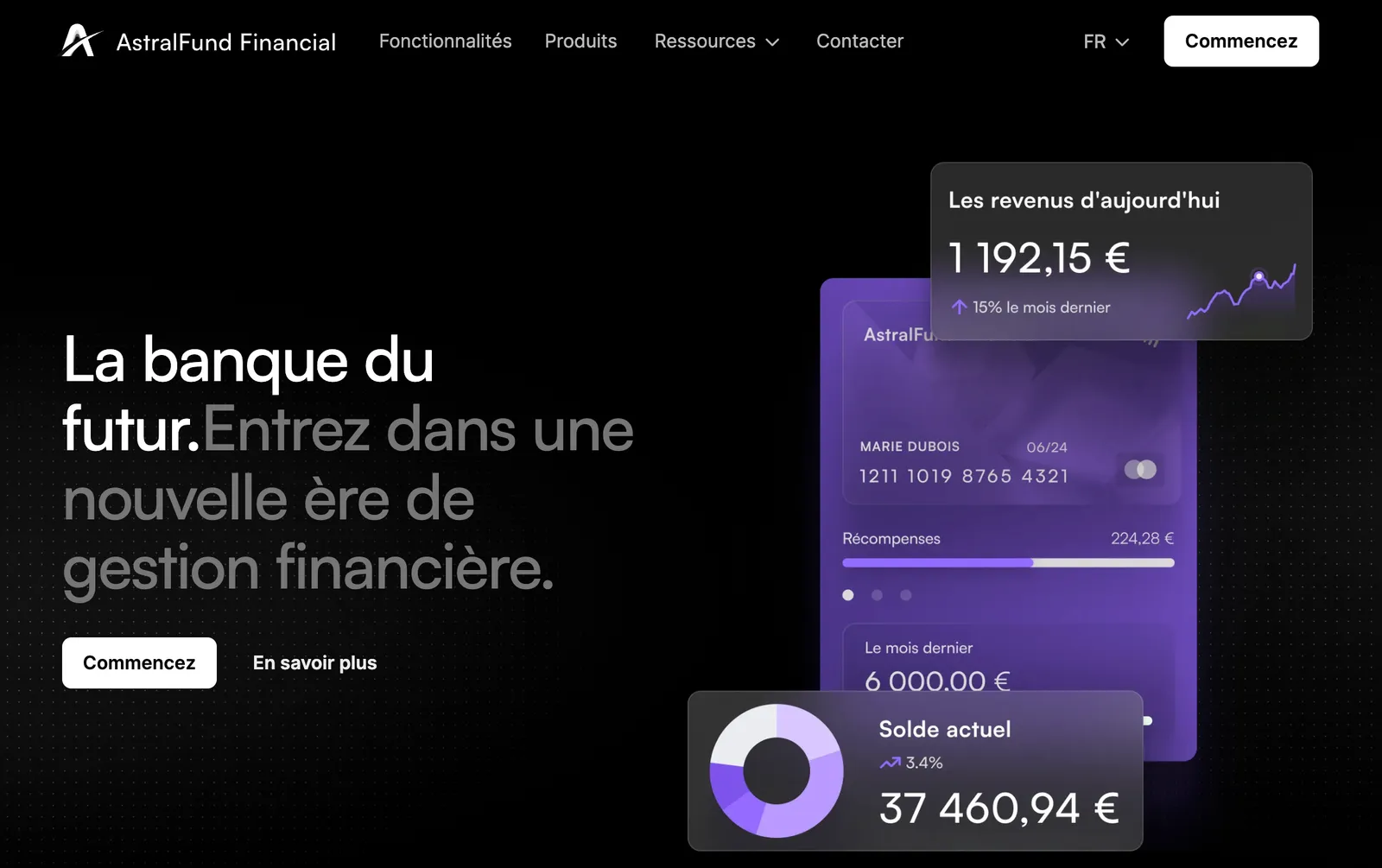
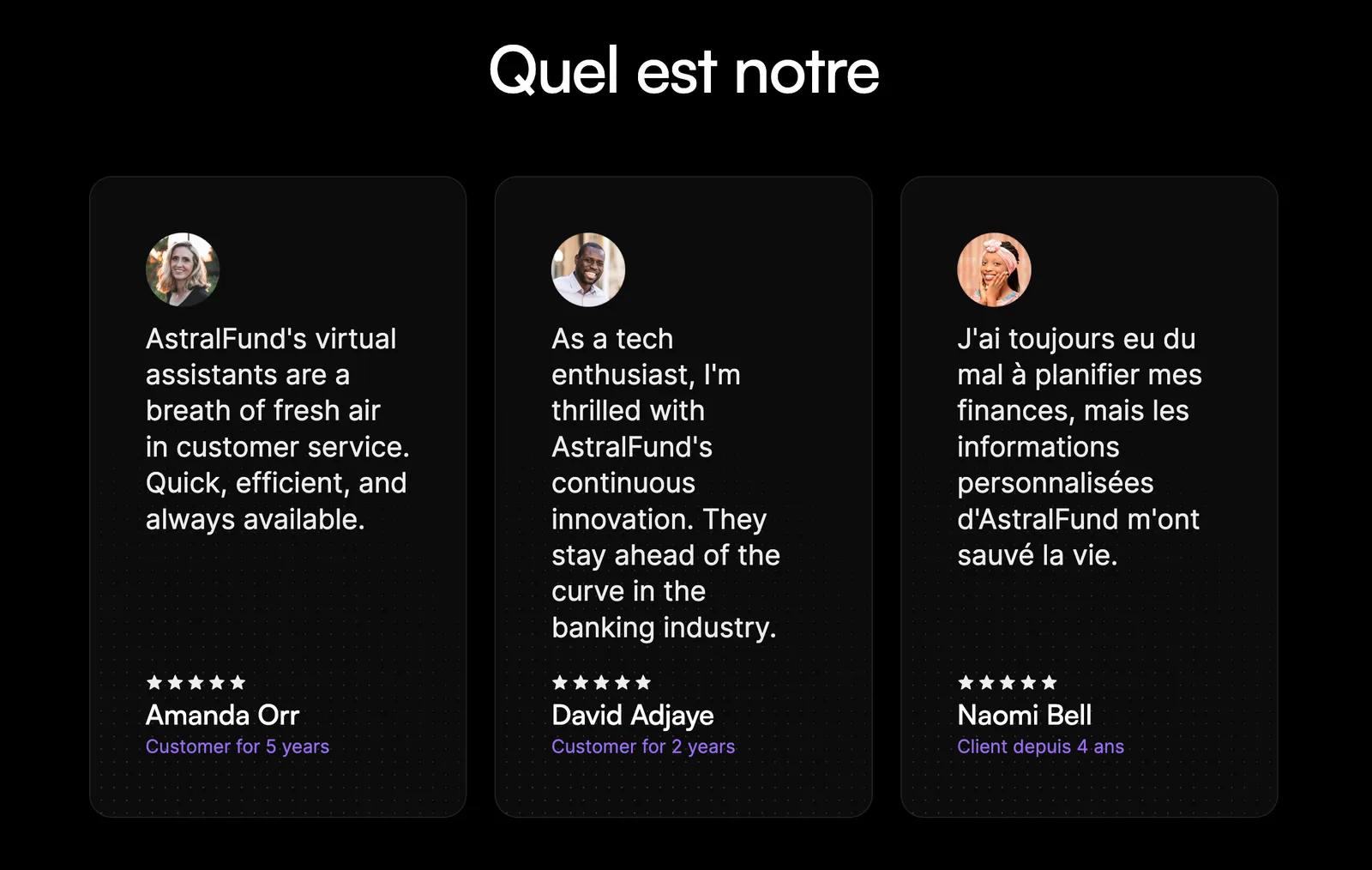
Let's look at an example. AstralFund is an imaginary bank that serves two locales – the United States and France. To properly address each market’s needs, the bank needs to localize content throughout the site. In the images below, we’ve localized some content. In this tutorial, we’ll walk through how to localize the entire site.
#### Primary Locale
### United States 🇺🇸
The site's primary locale is set to the United States with content in English.
#### Secondary Locale
### France 🇫🇷
A secondary locale for France is available, with the homepage localized in French. Notice, the localized image and the decimals replaced by commas. However, some content, like the testimonials, still needs to be localized.
## What we'll build
In this tutorial, we'll walk through the process of localizing content for a French audience on a website. By the end of this tutorial, you'll have a fully localized “Contact Us” page and a new testimonial that resonates with your French audience. You'll learn how to:
* Identify primary and secondary locales within Webflow.
* Localize the DOM elements like text and images.
* Optimize SEO data for different locales.
* Manage CMS content across multiple locales.
## Prerequisites
* **[Astral Fund Cloneable](https://webflow.com/made-in-webflow/website/astralfund-919afdc1091df68b8dc1347f952a?searchValue=astral)**
* **[Localization Example](https://github.com/Webflow-Examples/Localization-Demo)** with code samples and localized data
* **Webflow site plan** that supports CMS
* **[Webflow App](/data/docs/register-an-app)** or a [Site Token](/data/reference/site-token) with the following scopes: `sites:read`, `cms:read`, and `cms:write`
* **Some knowledge of HTTP requests and JavaScript**
\
#### 1. Clone AstralFund and Identify Localization Opportunities
1. [Clone the AstralFund](https://webflow.com/made-in-webflow/website/astralfund-919afdc1091df68b8dc1347f952a?searchValue=astral) site to your Webflow account, and add it to a Workspace used for testing.
2. [Publish the site](https://help.webflow.com/hc/en-us/articles/33961351954579) to set it live.
3. Navigate to the French locale to see the localized French homepage.
4. Navigate to the Contact page in French. Note the content that is not yet localized. We’ll fix this by localizing the navigation bar, contact content, form, footer, and SEO data.
#### 2. Set up the Development Environment
1. **Clone the Example Repository** \
Clone the [example repository](https://github.com/Webflow-Examples/Localization-Demo) and install dependencies.
```bash
git clone https://github.com/Webflow-Examples/Localization-Demo.git
cd localization-demo
npm install
```
2. **Authenticate with your Bearer Key** \
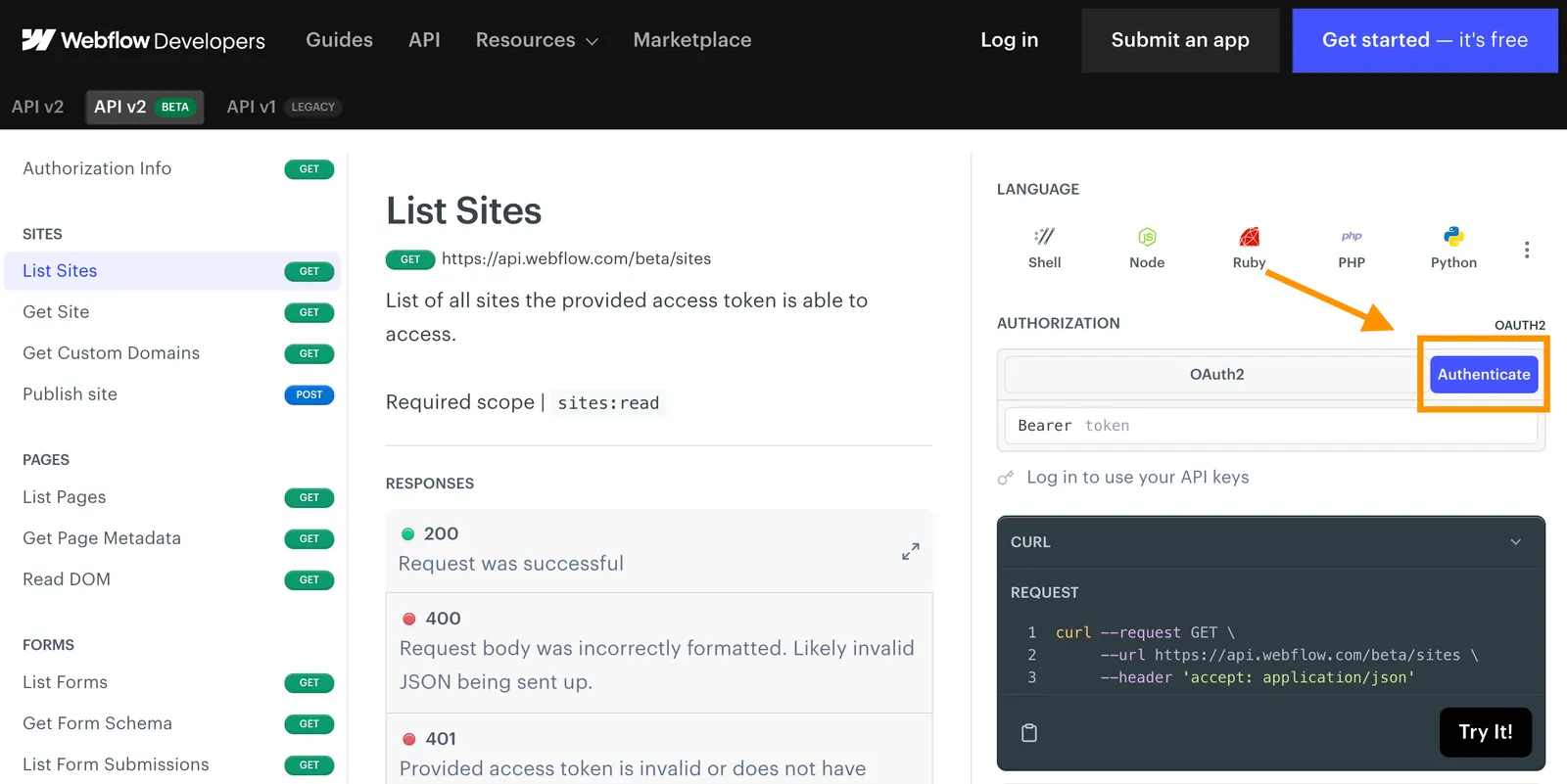
Make sure you have a valid Bearer Key that is authenticated for your new site. You can do this by authenticating through our API reference docs. Once you have your Bearer Key, store it in your `.env` file as `WEBFLOW_API_TOKEN`.
3. **Create `localization.js`** \
There's a full example of all the steps below in `index.js`. However, if you'd like to follow along with this guide, create a new file called `localization.js`, and include the following imports of the translated content, as well as the [Webflow Javascript SDK](https://www.npmjs.com/package/webflow-api).
**`localization.js`**
```js localization.js
// Import the pre-prepared localized content
import localizedDOM from "./helpers/Contact Us - French.json" assert {type: "json"}; // Localized "Contact Us" DOM
import localizedMetadataBody from "./helpers/seoData.json" assert {type: "json"}; // Localized SEO Data
import frenchTestimonials from "./helpers/Testimonials - French.json" assert {type: "json"}; // Localized Testimonials
import newFrenchTestimonial from "./helpers/newTestimonial.json" assert {type: "json"}; // New French Testimonial
// Import the Webflow Javascript SDK
import { WebflowClient } from "webflow-api";
import dotenv from "dotenv";
```
4. **Initialize the API** \
Create an asynchronous function, and initialize the API using the Webflow JavaScript SDK:
**`localization.js`**
```javascript localization.js
async function localizePage() {
try {
// Initialize the API.
dotenv.config();
const token = process.env.WEBFLOW_API_TOKEN;
const webflow = new WebflowClient(\{ accessToken: token });
/* ADD CODE FROM GUIDE HERE */
} catch (error) {
console.error("An error occurred:", error);
}
}
localizePage();
```
> **Info**
>
> After each step, you can run the file by typing the command `node localization` to see your progress.
#### 3. Retrieve Locale Identifiers
In this step we'll retrieve the site and locale identifiers, so that we can make locale-specific requests to our site.
1. **Call the List Sites endpoint to find your `siteId` and `locale` information.** \
Replace the `siteName` variable with the name of your cloned site.
**`JavaScript`**
```javascript JavaScript
// List sites and get the Astral Fund site's details
const siteName = "AstralFund" // Change the site name to the name of your cloned site
const sites = await webflow.sites.list();
const astralFundSite = sites.sites.find((site) =>
site.displayName.includes(siteName)
);
const siteId = astralFundSite.id;
const siteDetails = await webflow.sites.get(siteId); // Get site details for locale information
```
2. **Extract the `localeId` for both English and French from the Site object:**
* Notice the `locales` parameter, which returns a `primary` locale, and an array of `secondary` locales.
* Each locale has useful information like the language, location, and more.
* In addition to a specific `localeId`, each locale also has a `cmsLocaleId`.
**`localization.js`**
```javascript localization.js
// Extract and store locale IDs
const locales = siteDetails.locales;
const secondaryLocaleId = locales.secondary[0].id; // French is the first secondary locale
const secondaryCmsLocaleId = locales.secondary[0].cmsLocaleId;
console.log([locales, secondaryLocaleId, secondaryCmsLocaleId]);
```
#### 4. Localize Page Content
In this step, we're getting the content from a static, primary page, and uploading a translated version to our locale-specific page.
1. **Get the `page_id` of the Contact Us page using the [List Pages](https://developers.webflow.com/data/reference/pages/list) endpoint.**
**`JavaScript`**
```javascript JavaScript
// Get the page information for "Contact Us"
const pages = await webflow.pages.list(siteId);
const contactPage = pages.pages.find((page) =>
page.title.includes("Contact")
);
const contactPageId = contactPage.id;
```
2. **Get the content of the Primary Locale using the [Read DOM](https://developers.webflow.com/data/reference/pages/get-content) endpoint.** \
This will return all content that can be localized from a static page, which we can then translate for our locale-specific page.
> **Info**
>
> 📘 As of Sep 22, 2023, we only support writing to Text and Rich Text to the DOM. We do not support updating images via this API.
3. **Modify the content to include localized versions of the nav bar, contact content, form, and footer.**
We've provided a localized DOM for you with `./helpers/Contact Us - French.json`. From this example, create a DOM write object, with an array of DOM Nodes and the `cmsLocaleId`.\
**`./helpers/Contact Us - French.json`**
```JSON maxLines=10 title="./helpers/Contact Us - French.json"
{
"pageId": "65427cf400e02b306eaa0496",
"nodes": [
{
"nodeId": "8017772e-bc46-5c59-54c0-134cdfd4b03a",
"text": "Contactez-nous
"
},
{
"nodeId": "8017772e-bc46-5c59-54c0-134cdfd4b03c",
"text": "Notre équipe d'experts en finances n'est qu'à un appel téléphonique. Composez notre numéro sans frais, et discutons !
"
},
{
"nodeId": "aa9e4de0-011e-ac64-cbc2-3ec4fa3a8bb8",
"text": "hello@astralfunds.com"
},
{
"nodeId": "aa9e4de0-011e-ac64-cbc2-3ec4fa3a8bbd",
"text": "+1 (555) 000-0000"
},
{
"nodeId": "aa9e4de0-011e-ac64-cbc2-3ec4fa3a8bc2",
"text": "398 11th Street, 2ème étage, San Francisco, CA 94103"
},
{
"nodeId": "8017772e-bc46-5c59-54c0-134cdfd4b0c4",
"text": "Merci ! Votre message a été reçu.
"
},
{
"nodeId": "8017772e-bc46-5c59-54c0-134cdfd4b0c6",
"text": "Notre équipe répondra à votre message dès que possible. Merci de votre patience.
"
},
{
"nodeId": "8017772e-bc46-5c59-54c0-134cdfd4b0c9",
"text": "Oups ! Quelque chose s'est mal passé lors de l'envoi de votre message.
"
},
{
"nodeId": "36c1f507-a281-83c4-8222-873b4179b955",
"text": "Commencez à banquer maintenant
"
},
{
"nodeId": "36c1f507-a281-83c4-8222-873b4179b957",
"text": "Adoptez une nouvelle ère de gestion financière
"
},
{
"nodeId": "36c1f507-a281-83c4-8222-873b4179b95b",
"text": "Commencez
"
},
{
"nodeId": "36c1f507-a281-83c4-8222-873b4179b95e",
"text": "En savoir plus
"
}
],
"pagination": { "limit": 100, "offset": 0, "total": 22 }
}
```
4. **Update the content of the French locale by making a `POST` request to the [Update DOM](https://developers.webflow.com/data/reference/pages/update-page-settings) endpoint.** \
Be sure to include the `localeId` in the `locale` query parameter.
**`JavaScript`**
```javascript JavaScript
// Get the DOM for the Contact Us page in English and translate to French
const primaryContactPageDom = await webflow.pages.getContent(contactPageId);
// Create the domWrite object with the nodes and cmsLocaleId
const domWrite = {
nodes: localizedDOM.nodes,
locale: secondaryLocaleId,
};
// Update the Contact Us page DOM with French content
await webflow.pages.updateStaticContent(contactPageId, domWrite);
```
#### 5. Update SEO Data
In this step, we'll update the SEO metadata for the French version of the page.
1. **Retrieve the primary page's SEO data via a `GET` request to the [Get Page Metadata](https://developers.webflow.com/data/reference/pages/get-metadata) endpoint.**
#### Request
**`JavaScript`**
```javascript JavaScript
// Get page metadata
const pageMetadata = await webflow.pages.getMetadata(contactPageId);
```
#### Response
**`Page Metadata`**
```JSON maxLines=10 title="Page Metadata"
{
"title": "Contact Us",
"slug": "contact-us",
"seo": {
"title": "Contact Us | AstralFund Financial",
"description": "Contact AstralFund Financial for expert financial advice and support. Our dedicated team is here to help you on your path to financial success. Contact us today."
},
"openGraph": {
"title": "AstralFund Financial - Your Partner for Financial Success",
"titleCopied": true,
"description": "Discover AstralFund's personalized financial services and take control of your financial future. Contact us to learn more.",
"descriptionCopied": true
}
}
```
2. **Translate the data so that it's relevant for the French audience.**
We've provided localized information for you with `./helpers/seoData.json`.
**`./helpers/seoData.json`**
```JSON maxLines=10 title="./helpers/seoData.json"
{
"title": "Contactez-nous",
"slug": "contactez-nous",
"seo": {
"title": "Contactez-nous | AstralFund Financier",
"description": "Contactez AstralFund Financier pour des conseils financiers experts et un soutien. Notre équipe dédiée est là pour vous aider sur votre chemin vers le succès financier. Contactez-nous aujourd'hui."
},
"openGraph": {
"title": "AstralFund Financier - Votre partenaire pour la réussite financière",
"titleCopied": true,
"description": "Découvrez les services financiers personnalisés d'AstralFund et prenez le contrôle de votre avenir financier. Contactez-nous pour en savoir plus.",
"descriptionCopied": true
}
}
```
3. **Update the SEO Data for the French locale via a `POST` request to the [Update Page Metadata](https://developers.webflow.com/data/reference/pages/update-page-settings) endpoint.**
Be sure to enter the `localeId` in the `locale` query parameter.
**`JavaScript`**
```javascript JavaScript
// Get page metadata
const pageMetadata = await webflow.pages.getMetadata(contactPageId);
// Create Localized Page Setting Request
const localizedMetadata = {};
localizedMetadata.locale = secondaryLocaleId;
localizedMetadata.body = localizedMetadataBody; // Use the localized SEO data
// Update SEO Data
await webflow.pages.updatePageSettings(contactPageId, localizedMetadata);
```
#### 6. Manage Testimonials with the CMS
To demonstrate AstralFund's commitment to the French market, we'll translate the existing testimonials, and create a French-specific testimonial from a French regulatory authority.
1. Get existing testimonials and translate them using our provided translation.
**`Javascript`**
```javascript Javascript
// Get Collections
const collectionsData = await webflow.collections.list(siteId);
const collections = collectionsData.collections;
// Find Testimonials Collection
const testimonialsCollectionId = collections.find(
(collection) => collection.displayName === "Testimonials"
).id;
const itemsData = await webflow.collections.items.listItems(
testimonialsCollectionId
);
const items = itemsData.items; // Get item data from testimonial collection
```
2. For each translated testimonial, update the CMS item via the Update Collection Item endpoint. Be sure to include `cmsLocaleId` in the Item.
**`JavaScript`**
```javascript JavaScript
try {
// For each CMS item
for (const [index, value] of items.entries()) {
// Add the secondary `cmsLocaleId` to the item
frenchTestimonials[index].cmsLocaleId = secondaryCmsLocaleId;
// Update the CMS item
const updatedItem = await webflow.collections.items.updateItemLive(
testimonialsCollectionId,
value.id,
frenchTestimonials[index]
);
console.log(`Item:`, updatedItem);
}
} catch (error) {
console.error(`Error updating CMS items:`, error);
throw error;
}
```
3. Create a French-only testimonial using our provided translation.
```javascript
// Create new item
try {
// Set the `cmsLocaleId` of the new item
newFrenchTestimonial.cmsLocaleId = secondaryCmsLocaleId;
const newTestimonial = await webflow.collections.items.createItem(
testimonialsCollectionId,
newFrenchTestimonial
);
console.log("Localization process completed successfully.");
} catch (error) {
console.error("Error Creating CMS Item:", error);
}
```
#### 7: Appreciate your beautifully localized site! 👏
Congratulations! You've localized your AstralFund site! Take a look around the site and see what other opportunities you have to localize content.
#### Primary Locale
### United States 🇺🇸
The site's primary locale is set to the United States with content in English.

#### Secondary Locale
### France 🇫🇷
A secondary locale for France is available, with the homepage localized in French. Notice, the localized image and the decimals replaced by commas. However, some content, like the testimonials, still needs to be localized.
