
Localizing components
Learn how to use the Data API to localize component content and properties across different locales.

Components are reusable design elements that can be instanced across your site.
Webflow enables you to localize both a component definition and component instances via the Data API.

Localize the static content of a component definition across an entire locale

Localize a component instance on a specific page by modifying its properties.
To understand how to localize components, you’ll need to understand the key concepts of components in Webflow.
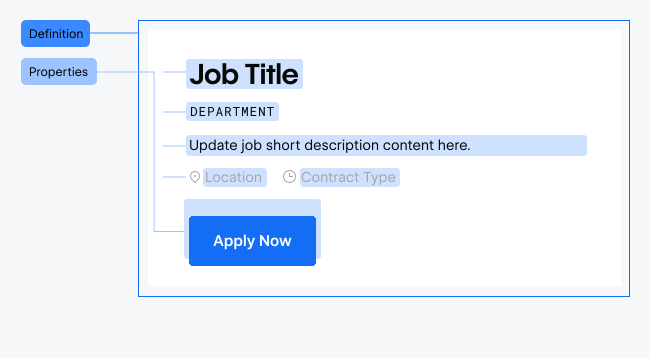
A component definition serves as the blueprint for a component. It contains the component’s static content, like text and images, and defines the component’s properties: customizable fields that allow for dynamic content. When you change a component definition, the updates apply to all instances of that component, unless an instance has a property override.
A component definition contains two types of localizable content:
Static content: Text nodes, form elements, and nested component instances
Property defaults: Default text values for component properties
To completely localize your site, you’ll need to localize all three types of component content.
Some key points to remember when localizing component content:
Component definitions contain two types of localizable content:

Text nodes, form elements, and nested component instances

Default values for component properties
To localize static content, you’ll first need to get the content of the selected component, and then update the content in a secondary locale.
Use the Get Component Content endpoint to get the static content of a selected component definition.
Use the Update Component Content endpoint to update the static content of the selected component definition in a secondary locale.
Use the List Components endpoint to get a list of all components on your site.
The endpoint returns a components array with the details of each component definition on your site. The response also includes a pagination object for pagination through results over the 100 item limit.
Retrieve existing static content from the primary locale for a specific component. Send a GET request to the get component content endpoint, and include the component id in the request path.
The response contains a nodes array with the component’s static content. Each node includes a type property that defines its content type.
Each node type has a specific structure and properties that define the
content it contains. However, all nodes will have id, type, and
attributes properties.
Node UUID
The type of the node.
The custom attributes of the node
Each node type has a unique structure for accessing component content.
For example, a text node contains a text object, which includes html and text properties. These properties provide context for strings that can be localized. See the tabs below for the specific properties for each node type.
Node UUID
The type of the node. text
The text content of the node
The HTML content of the node
The text content of the node
The custom attributes of the node
The text.html property may contain nested HTML tags with data-w-id attributes (e.g., data-w-id="some-unique-identifier"). Retain these identifiers when updating page content in secondary locales to preserve custom attributes and links on inner HTML elements.
After translating the content you received from your earlier request, update it with the update component content endpoint, passing the target localeId as a query parameter and the translated nodes in the request body.
You only need to include the nodeId and the content property for that specific node type.
A successful response will return an object with and error property with an empty array.
Component properties are typed variables that make component content dynamic and customizable per instance. When content is bound to a property, each component instance can have different values for that property.
Component definitions can store default values for properties, which are used as fallbacks when instances don’t have property overrides. To localize the default values follow the steps below.
Use the Get Component Properties endpoint to get the default properties of the selected component definition.
Use the Update Component Properties endpoint to update the default properties of the selected component definition.
Use the List Components endpoint to get a list of all components on your site.
The endpoint returns a components array with the details of each component definition on your site. The response also includes a pagination object for pagination through results over the 100 item limit.
Retrieve component property definitions and their default values using the Get Component Properties endpoint.
The response will return an object with the componentId, properties, and pagination properties. Each property will have a type and text property, which contains the property’s default text value.
Component properties can be of different types:
Localize component property default values using the Update Component Properties endpoint. Provide a properties array with each of the property IDs and the translated strings in the text field. You must pass the localeId of the secondary locale you want to update as a query parameter.
A successful response will return an object with and error property that contains an empty array.
When you add a component to a page, you create an instance. To customize the content of an instance, you can override the default properties of that instance. Only overridden properties can be localized via the properties endpoints.
Component instances appear in the page content response as component-instance nodes. To get page content, use the Get Page Content endpoint.
The response will return a list of nodes. Any component-instance type nodes will have a propertyOverrides array with a list of available properties to localize. If a property hasn’t been overridden on the instance, it won’t be included in the propertyOverrides array.
Each object in the propertyOverrides array will have the following properties:
The unique identifier for the property being overridden.
The type of the property.
The user-defined label for the property.
An object containing the overridden text content.
The HTML content for “Rich Text” properties. This will be null for “Plain Text” properties.
The plain text content for “Plain Text” properties. This will be null for “Rich Text” properties.
In this example, the component instance has overridden two properties (“Title” and “Description”) with page-specific values. Any other properties defined in the component will use their default values from the component definition.
To localize a component instance, create a new nodes array, and include an object with the nodeId of the component instance and a propertyOverrides array. Each item in the array should have the propertyId and text of the property overrides for the secondary locale.
A successful response will return an object with and error property with an empty array.
Here’s a complete example demonstrating component localization across definitions and instances:
data-w-id attributes in HTML content. These identifiers preserve custom styling, animations, and links across locales. Example:
limit and offset parameters in GET requests to retrieve all nodes/properties for components with extensive contentComponent definition localization affects all the base static content that lives in each instance of that component across your site, while instance localization only affects the specific component instance on a particular page through property overrides.
No, read-only components (like those from Workspace Libraries) can’t be
updated via the APIs. These components are marked with readonly: true in
the List Components response.
Yes, updating component definition property defaults affects all instances that don’t have property overrides for those specific properties. Instances with overrides maintain their custom values and won’t be affected by changes to the component definition.
In the primary locale, all component instances appear in the Get Page Content response. In secondary locales, only component instances with property overrides are included, providing a focused view of customized content that differs from the default component definition.
No, static content and properties require separate API calls. Use the Update Component Content endpoint for static content and Update Component Properties for property values.
If you omit data-w-id attributes when updating HTML content, you may lose
custom attributes or links that were applied to those elements in Webflow.
Always preserve these identifiers exactly as they appear in the original
content.


