

Webflow Cloud
Webflow Cloud is a deployment and hosting environment for web applications. You can deploy framework apps and no-framework static apps alongside Webflow sites or separately.
Get started


Use or create a button that deploys an application from Github to Webflow Cloud.


Deploy a template app in minutes with our step-by-step guide.


Already have a codebase? Follow these steps to deploy it on Webflow Cloud.


Browse example apps built on Webflow Cloud. For deploy-ready starters in every framework, see Start from a starter app.
Supported app paths
Webflow Cloud supports Next.js, Astro, Vite, and no-framework static apps.


Deploy full-stack Next.js applications with powerful server-side rendering, intelligent page optimization, and seamless integration with Webflow components.


Create high-performance, content-focused websites that ship minimal JavaScript by default while preserving Webflow’s design capabilities.
Deploy Vite apps, including React, Vue, Svelte, and vanilla JavaScript, with framework-aware build handling.


Deploy plain HTML, CSS, and JavaScript with no framework build step.
See Optimizing your app for Webflow Cloud for framework details.
Storage
Webflow Cloud provides built-in, flexible storage for modern web apps.


Reliable, relational storage for structured data


Fast, edge-cached storage for unstructured data


Scalable, secure storage for files and media
Webflow CLI
The Webflow CLI includes commands for working with Webflow Cloud applications. See the Webflow Cloud section of the CLI command reference.
Working with Webflow Cloud
Webflow Cloud applications can be part of a site or an independent app in the Workspace.
In either case, you store the code of the application on a GitHub repository and Webflow Cloud deploys the application when you make changes to the repository.
The primary difference is that creating an app as an independent app allows you to host the app at a root URL, such as my-app.webflow.io, rather than my-site.webflow.io/my-app.
-
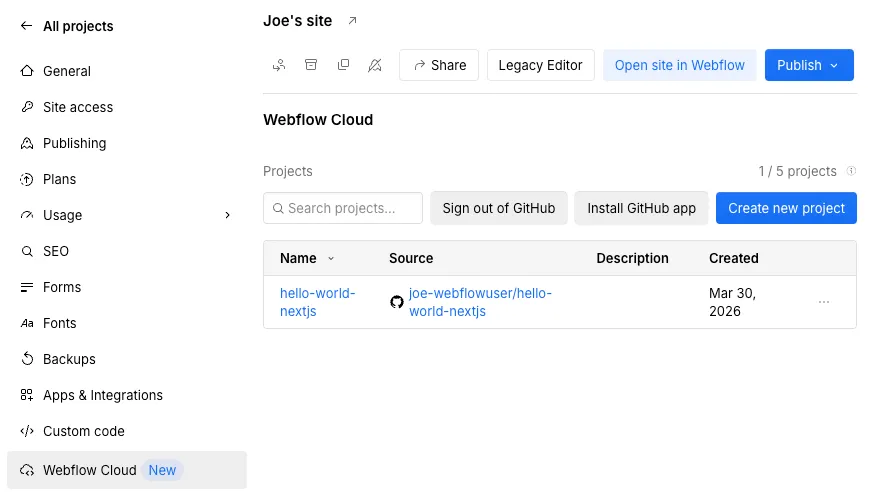
To create a Webflow Cloud app that is part of a site, open the site settings, go to Webflow Cloud, click New project > Create app, and follow the steps to import the GitHub repository with the app.
Apps that you create in this way are shown in the site settings, in the Webflow Cloud section, as in this picture:
-
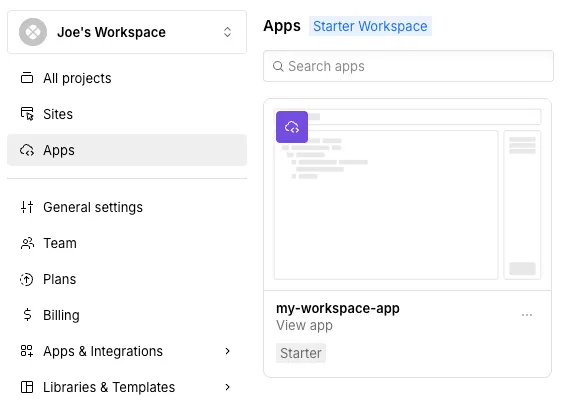
To create a Webflow cloud app that is not part of a site, go to the dashboard and click New Project > App, and follow the steps to import the GitHub repository with the app.
Apps that you create in this way are shown as an app in the Apps tab, on the same level as sites in your Workspace, as in this picture:
Webflow Cloud applications have these components: