

Databricks
This guide walks you through configuring Databricks as a destination for your Webflow Analyze and Optimize data export.
Prerequisites
- By default, this Databricks integration makes use of Unity Catalog data governance features. You will need Unity Catalog enabled on your Databricks Workspace.
Configuration steps
Create a SQL warehouse
Create a new SQL warehouse for data writing.
-
Log in to the Databricks account.
-
In the navigation pane, click SQL Warehouses.
-
In the SQL Warehouses console, click Create SQL Warehouse.
-
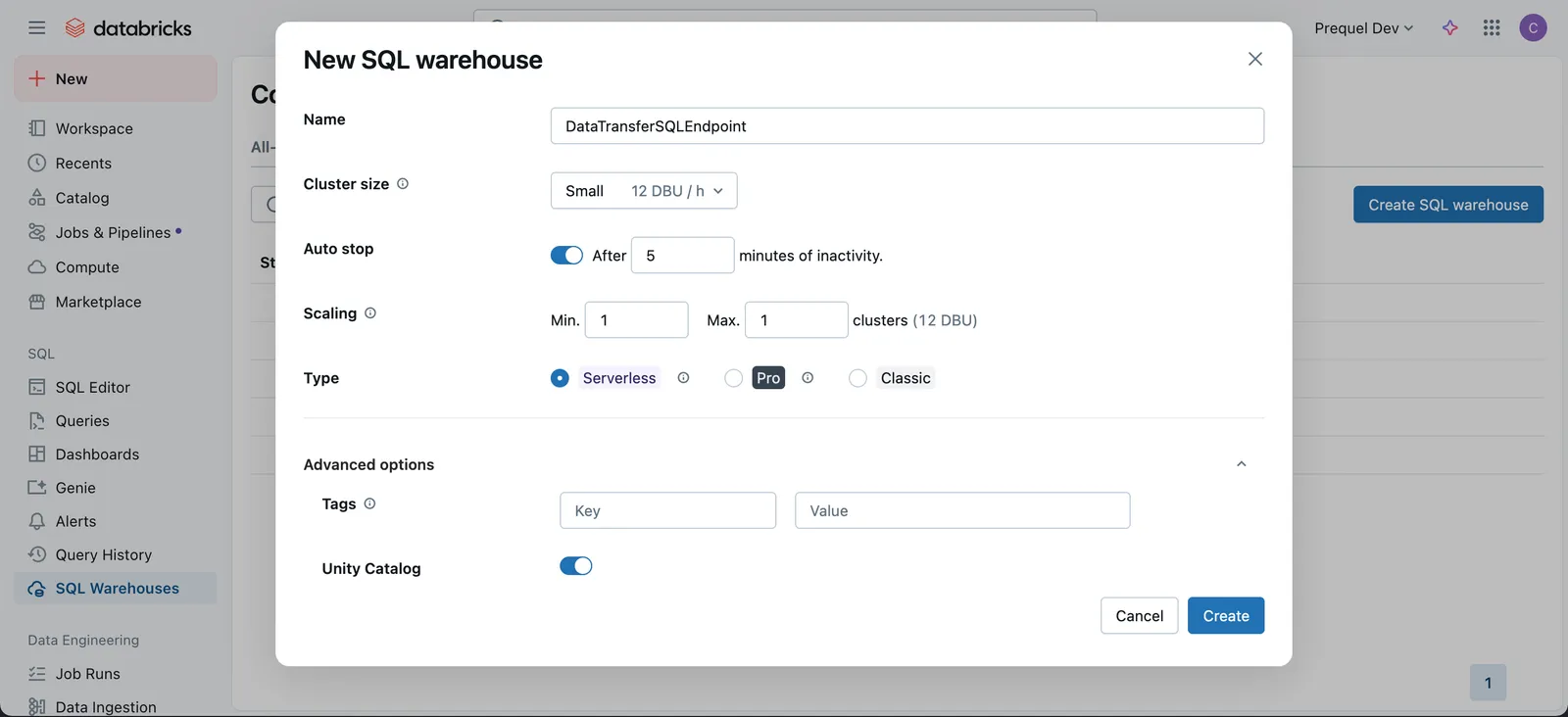
In the New SQL Warehouse menu, choose a Name and configure the options for the new SQL warehouse. Under “Advanced options” ensure “Unity Catalog” is in the On position and click Create.
Configure access
Option A: OAuth Secret (Recommended for most users)
- In your Databricks workspace, click your username or icon in the top right, click Settings, Identity and access, and next to the Service Principals options, click Manage.
- Click the Add service principal button, click Add new in the modal, enter a display name and click Add.
- Click on the newly created Service Principal, and under the Secrets tab, click Generate secret.
- Enter a lifetime for the secret (e.g., 90 days, 180 days, or 365 days), click Generate and make a note of the Secret value and Client ID.
- Navigate back to the SQL Warehouses section of your Workspace, click the SQL Warehouses tab, and select the SQL Warehouse you created in Step 1. Click Permissions in the top right, search for and select the Service Principal you created, select the Can use permission, and click Add.
- In the Databricks UI, select the Catalog tab, and select the target Catalog. Within the catalog Permissions tab, click Grant. In the following modal, select the Service principal for which you generated the OAuth token, select
USE CATALOG, and click Grant. - Under the target Catalog, select the target schema (e.g.,
main.default, or create a new target schema). Within the schema Permissions tab, click Grant. In the following modal, select the principal for which you generated the access token, and select eitherALL PRIVILEGESor the following 9 privileges and then click Grant:USE SCHEMAAPPLY TAGMODIFYREAD VOLUMESELECTWRITE VOLUMECREATE MATERIALIZED VIEWCREATE TABLECREATE VOLUME
Option B: Personal Access Token (PAT)
Collect connection information and create an access token for the data transfer service.
-
In the SQL Warehouses console, select the SQL warehouse you created in Step 1.
-
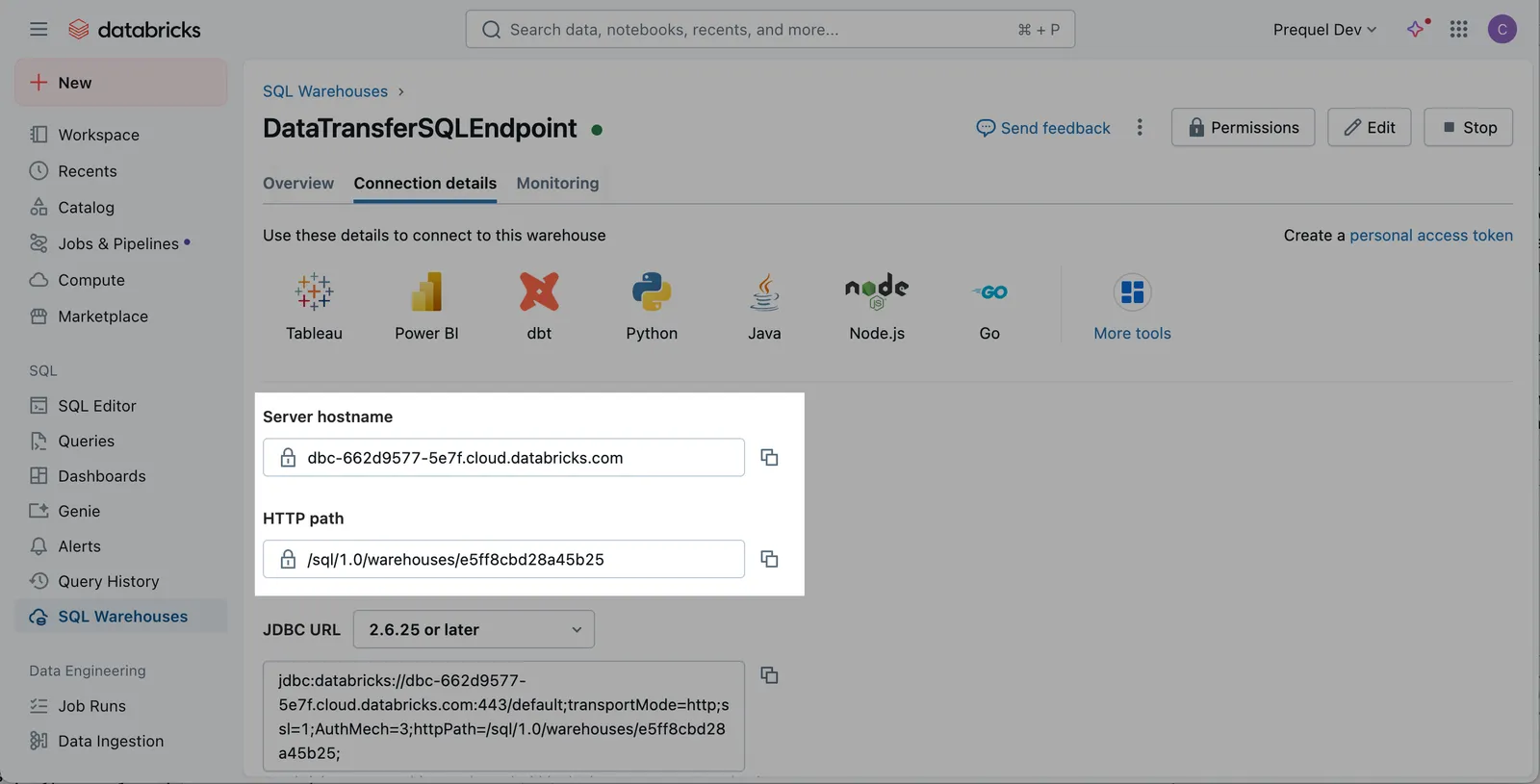
Click the Connection Details tab, and make a note of the Server host name, Port, and HTTP path.
-
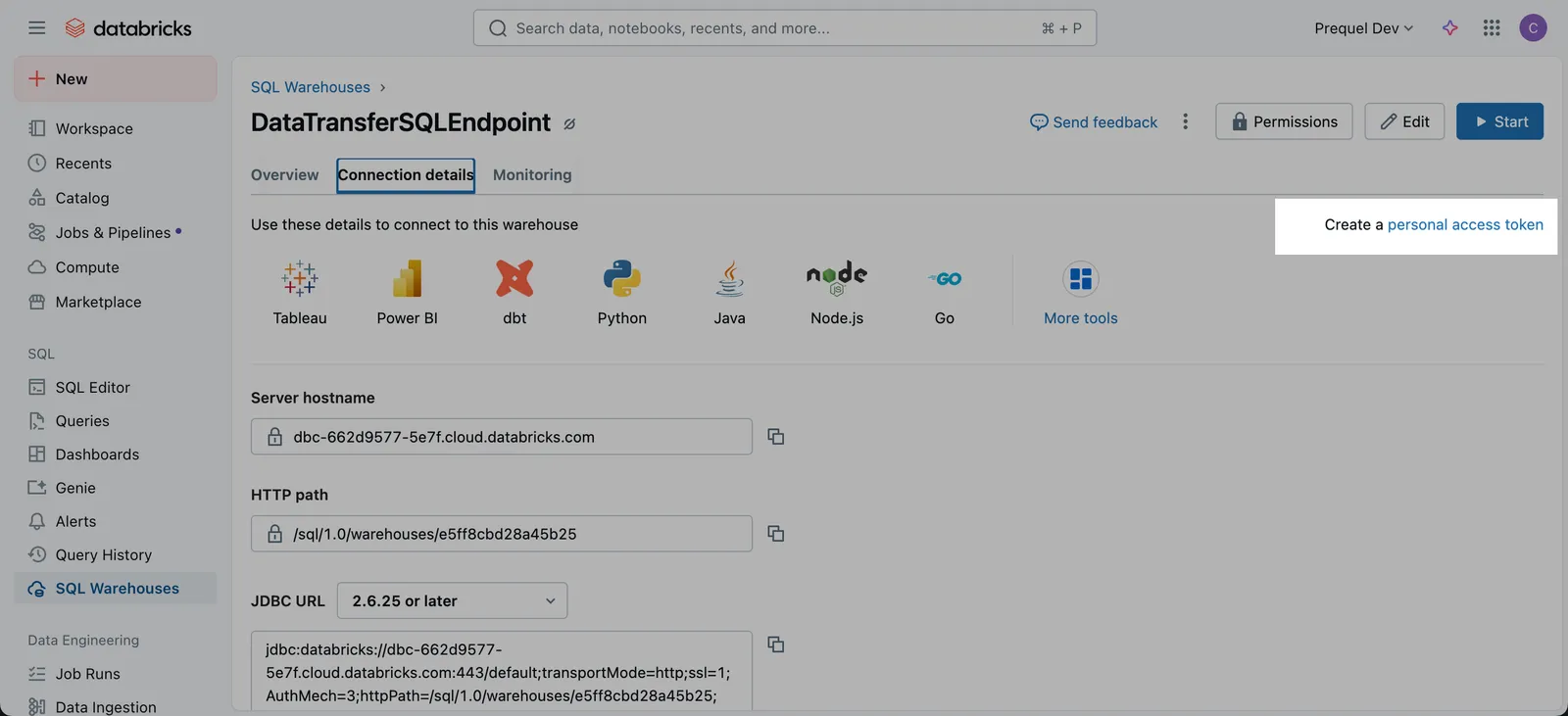
Click the link to Create a personal access token.
-
Click Generate New Token.
-
Name the token with a descriptive comment and assign the token lifetime. A longer lifetime will ensure you do not have to update the token as often. Click Generate.
-
In the pop up that follows, copy the token and securely save the token.
Using a Service Principal & a Personal Access Token (“PAT”) tied to the Service Account
You may prefer to create a Service Principal with a PAT to use for authentication instead of using your account’s Personal Access Token. To do so, use the following steps to create a Service Principal and generate a PAT on behalf of the Service Principal.
- In your Databricks workspace, click your username or icon in the top right, click Settings, Identity and access, and next to the Service Principals options, click Manage.
- Click the Add service principal button, click Add new in the modal, enter a display name and click Add.
- Click on the newly created Service Principal, and under Entitlements select Databricks SQL Access and Workspace Access. Click Update, and make a note of the Application ID of your newly created Service Principal.
- Back in the Admin Settings menu, click the Advanced section (under the Workspace admin menu). In the Access Control section, next to the Personal Access Tokens row, click Permission Settings. Search for and select the Service Principal you created, select the Can use permission, click Add, and then Save.
- Navigate back to the SQL Warehouses section of your Workspace, click the SQL Warehouses tab, and select the SQL Warehouse you created in Step 1. Click Permissions in the top right, search for and select the Service Principal you created, select the Can use permission, and click Add.
- Use your terminal to generate a Service Principal Access Token using your Personal Access Token generated above. Record the token value. This token can now be used as the access token for the connection.
-
In the Databricks UI, select the Catalog tab, and select the target Catalog. Within the catalog Permissions tab, click Grant. In the following modal, select the principal for which you generated the access token, select
USE CATALOG, and click Grant. -
Under the target Catalog, select the target schema (e.g.,
main.default, or create a new target schema). Within the schema Permissions tab, click Grant. In the following modal, select the principal for which you generated the access token, and select eitherALL PRIVILEGESor the following 9 privileges and then click Grant:USE SCHEMAAPPLY TAGMODIFYREAD VOLUMESELECTWRITE VOLUMECREATE MATERIALIZED VIEWCREATE TABLECREATE VOLUME
IP Access Lists (optional)
If your workspace enforces Databricks IP Access Lists, allowlist the static egress IP(s) used by the data transfer service so connections and test sessions can open successfully. See Databricks documentation: Databricks IP Access Lists.
Webflow Static IP: 34.69.83.207/32
Add your destination
Use the following details to complete the connection setup: server host name, HTTP path, catalog, your chosen schema name, and authentication details.
- Instructions for Analyze / Optimize for Webflow sites
- Instructions for Optimize for non-Webflow sites
Permissions checklist
- Workspace: Service principal or user has permission to use the target SQL warehouse (“Can use”).
- Unity Catalog:
USE CATALOGon the target catalog; appropriate privileges on the target schema (e.g.,USE SCHEMA,CREATE TABLE, and read/write volume privileges as needed), orALL PRIVILEGESon the schema. - If using Hive Metastore (instead of UC): select
hivemetastore explicitly and configure required object storage staging (bucket and credentials), with write/delete permissions. - Network: If IP Access Lists are enabled, the static egress IP(s) are allowlisted.
FAQs
What supported authentication method is recommended to securely connect to Databricks?
Recommended: OAuth with a service principal. OAuth issues short-lived tokens, scopes access via the principal’s entitlements and UC grants, and supports centralized rotation and revocation. Personal Access Tokens (PATs) are supported where policy requires, but they are long-lived bearer tokens and typically inherit broader, user-level permissions.
What permissions are required?
The connection identity needs Can use on the SQL warehouse, USE CATALOG on the target catalog, and schema-level privileges to create/manage tables (or ALL PRIVILEGES on the schema). Missing USE CATALOG is a frequent cause of test-connection failures.
What credentials and connection details are required?
Provide server host name, HTTP path, Catalog, Schema, and an OAuth client (service principal) or PAT with warehouse access. Collect host/path from the SQL Warehouses console.
Do you support Unity Catalog and Hive Metastore?
Yes. Unity Catalog is the default. For Hive Metastore, explicitly select hive in configuration and supply an S3 staging bucket and credentials. Using the wrong metastore type can cause discovery or permission issues.