

Workspace Token
Workspace tokens provide access to workspace-specific resources via the Webflow Data API.
These tokens are useful for workspace administrators that need access to workspace-level information and audit logs. For access to site data, use a site token instead.
Workspace tokens are only available for Enterprise workspaces.
Scopes and endpoints
Create workspace tokens with the following scopes and endpoints.
Workspace tokens use separate scopes and resources than site tokens. For example, workspace tokens don’t have access to the site scope, therefore they can’t access site-specific endpoints like Get Site Information. To ensure you’re using the correct token for your use case, please refer to the scopes and resources documentation.
Creating a workspace token
Only workspace administrators can create a workspace token.
-
In the left sidebar of your Workspace, select Apps & integrations > Manage. Scroll to the bottom of the page to the Workspace API access section.

-
Click “Generate API token”.
-
Enter a name for your API token.
-
Choose the permissions you want the API token to have for each scope. (e.g., no access or read-only).
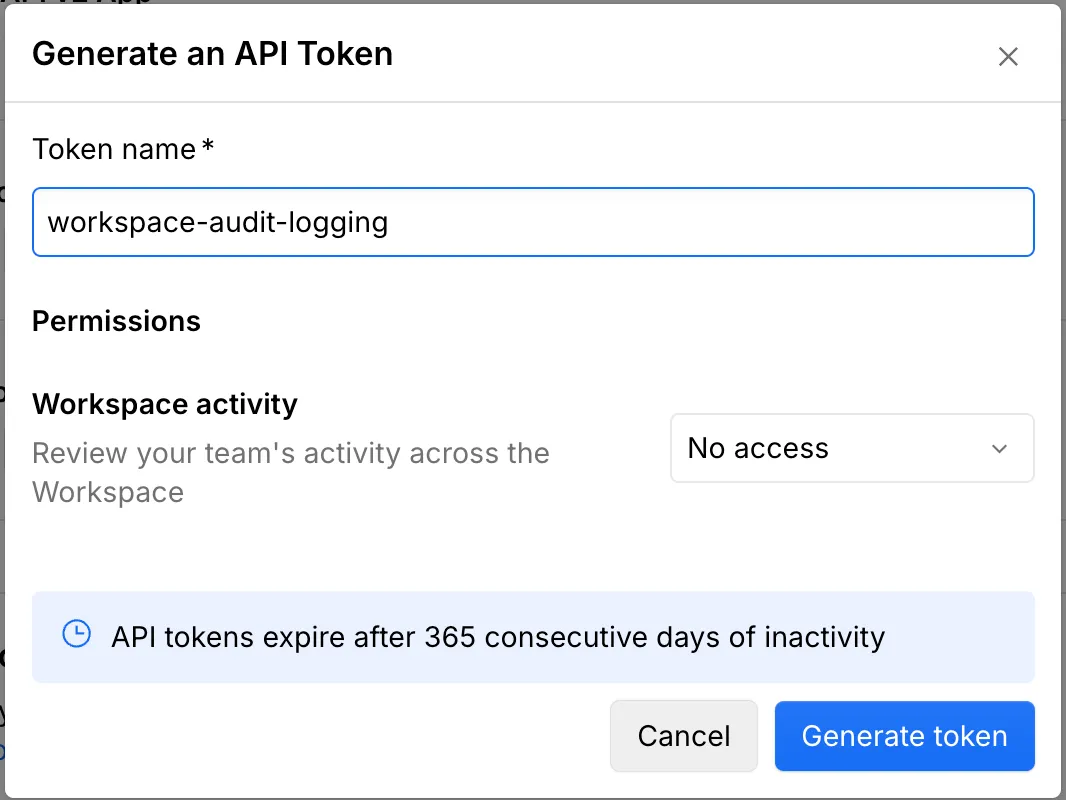
-
Click Generate token.
-
Copy the generated token to your clipboard and save it in a secure location.
Limitations
- Enterprise only. Workspace tokens are only available for Enterprise workspaces.
- API tokens expire after 365 consecutive days of inactivity. Any API call made with the token before expiry will reset the inactivity period.
- Each workspace can have up to 5 tokens. This limit ensures manageable token access and security.
- Limited endpoints. Workspace tokens are designed with different scopes than site tokens. For example, workspace tokens don’t have access to the
sitescope, therefore they can’t be used to access site-specific endpoints. Please refer to the scopes documentation for more information.
Using a workspace token
Now that you have your workspace token, you can start making requests to the Webflow Data APIs that require a workspace token.
cURL
JavaScript
Python
The simplest way to make a request is by using cURL
Example
This command retrieves a list of activity across your workspace. Replace YOUR_API_TOKEN with the workspace token you generated.
Example API response
Here’s an example of what a response from the Webflow API might look like:
Best practices
- Mint tokens for each use case: Instead of reusing tokens, generate a new token for each specific use case to maintain better security and control.
- Rotate tokens periodically: Regularly update and revoke old tokens to maintain security.
- Be Descriptive: Name your tokens something descriptive and meaningful to easily identify their purpose.
- Minimal Scopes: Generate tokens with the minimal scopes needed for your use case. Mint a new one if you need to add new scopes. This limits the potential impact if a token is compromised.
Revoking a workspace token
To revoke a workspace token:
- In the left sidebar of your Workspace, select Apps & integrations > Manage. Scroll to the bottom of the page to the Workspace API access section.
- Find your workspace token
- Click the “Revoke” button

Revoking a site token is an additional security measure for your Webflow site. This process disables the token, preventing any further access or use. You should consider revoking a site token in the following situations:
- Security Concerns: If there’s a potential security issue, revoke the token immediately.
- Administrator Changes: If an administrator leaves or their role changes, revoke their token to maintain security.
- Token Management: Regularly review and revoke tokens that are no longer needed.
Troubleshooting and FAQs
How long is a workspace token valid?
Workspace tokens are valid until they’re manually revoked or after 365 days of inactivity.
Can I regenerate a workspace token?
You can not regenerate an existing token. However you can generate a new token at any time from the API access section in your workspace settings.
What happens if I lose my workspace token?
You will need to generate a new workspace token and update any integrations using the old token.